Understanding Content Encryption in VIDIZMO
It is no surprise that as much as the world has shifted towards digital globalization with access to information over the internet, cybercrime has taken its toll on enterprises striving to protect access to confidential information. According to a report by Software Alliance, cybercriminals stole around 423 million different identities in the year 2015. In 2018 alone, 5 billion records were exposed in alleged data breaches around the globe.
With proliferation of threats to data security, businesses proactively opt for solutions that allow end-to-end encryption of content. Read further to understand how VIDIZMO allows your content to be encrypted at rest, in transit as well as in use.
What is Encryption?
Encryption is a mechanism to encode your information such that it is no longer decipherable even if it is compromised. A typical encryption algorithm substitutes alphanumeric characters with other characters to create a cipher. A cipher is a sequence of characters that represent the original data but cannot be made sense of if intercepted or accessed illegally. Only the computer/authorized person who created the cipher possess the key to decode it into readable language again.
Encryption at-rest, in-use and in-transit
Content can be encrypted in one of the three states:
- Encryption at rest This refers to having your data or content encrypted where it is resting (or is stored). This entails that the physical location of your data (on stand-alone hardware disks or storage servers), even if hacked or fallen victim to unlawful custody, will not contain raw data that can be intercepted or perceived by an unauthorized user.
- Encryption in transit This refers to when your data is being transferred from one physical location to another such as being transmitted over the internet - an example of which would be an email being sent or a video being uploaded on cloud.
- Encryption in use This refers to when you consume data in a cloud-based application such as when you view an image, watch a video or annotate an image within VIDIZMO portal.
Purpose of Encryption
Encryption is a crucial component of a defense-in-depth approach because it can mitigate vulnerabilities in your primary access control mechanism. What if an access control mechanism fails and allows access to the raw data on disk (at rest) or traveling (in transit) along with a network link? If the content is encrypted using strong algorithms, it is computationally infeasible for an attacker to decrypt your content. Encryption ensures your data is safe in various common business scenarios such as:
- When data is forsaken due to unauthorized access of physical hard disks.
- When deleted data from the application is attempted to be recovered from storage servers
- When content is played back, such as in a video streaming solution as VIDIZMO, via browser applications and original content URLs are intercepted between network calls.
Concept
How does VIDIZMO Encryption work
VIDIZMO uses AES-128 encryption algorithm to generate keys for content encryption. An AES-128 bit key is proven to be computationally very difficult to decrypt. It is projected that cracking a single AES-128 bit key would take approximately 500 billion years.
Meanwhile, VIDIZMO uses a double encryption mechanism where it uses another AES-128 Encryption key to encrypt the key that was originally used to encrypt the content. This magnifies the complexity of the key by multifold. Both of these keys are saved securely in the database.
When a media is uploaded in an encryption-enabled VIDIZMO portal then during transcoding, the media and its corresponding renditions (HLS) will be encrypted and uploaded on content storage. Similarly, all meta-data files associated with a media will be encrypted afterwards such as Closed Caption files or Geo-Spatial (KLV) files.
When encrypted content is played back, then HLS content will be decrypted chunk by chunk. Encrypted content would be served from all browsers and devices on the playback page, media info, studio space and clipping screen, and thumbnail capture.
What Media types and files does VIDIZMO encrypt
VIDIZMO provides support for end-to-end content encryption using VIDIZMO On-Premise Encoder which can be configured with all available storage providers.
VIDIZMO encrypts all supported media types that can be ingested in the platform:
- Videos & Audios: They are decrypted by VIDIZMO player on-the-fly, and will otherwise be unintelligible to anyone who does not have the authority to access it.
- Images & Documents: They are encrypted similarly by a key that renders them as password-protected for unauthorized users.
The following is a list of files that are encrypted at-rest for all above media types when using VIDIZMO portal:
- Rendition files produced after transcoding, wherever applicable
- Preview Thumbnails (Sprite Images)
- Closed Caption Files
- KLV Files for Geo-Spatial Data
If content encryption is enabled, VIDIZMO encoder automatically encrypts every chunk produced as a result of transcoding activity. These encrypted HLS chunks are then stored into your configured Storage Provider.
Note: For videos, only HLS rendition files are produced by default which are then encrypted and stored in the content provider. If a user opts to enable other available encoding profiles for media, then those additional renditions will not be encrypted at-rest.
How to Download Encrypted Content
In case a user requests for downloading encrypted content, they will be able to receive two options:
- Original file
- mp4 file for ease of playback
Once they choose their preferred format, they will receive a link to download the decrypted content.
Considerations and Limitations
There are a few limitations that you should keep in mind while availing the feature for Content Encryption:
- If your portal is hosted on a domain without a secure SSL/TLS protocol, encrypted content playback may not function correctly in all browsers. The VIDIZMO player displays a notification if playback is affected by a non-secure connection.
- Information generated as video insights using Indexing apps available in VIDIZMO will not be encrypted at-rest.
- Currently, offline video playback does not work with encrypted content.
- When using VIDIZMO Encoder for Content Encryption, downloading physical files is supported with Azure Storage Provider.
- When you upload closed caption files with encryption enabled, the file is sent for encryption which changes its name. If you select Save again on Media Settings without refreshing the page, the originally uploaded closed caption file is submitted again for processing and overwrites the first file.
- If you disable encryption after enabling it, previously encrypted content remains encrypted. The encryption setting only applies to newly uploaded files.
Note: VIDIZMO does not alter the original uploaded media file in order to maintain the integrity of the uploaded content. This helps VIDIZMO Digital Evidence Management (DEMS) users ensure the credibility of the digital evidence by verifying the checksum of the raw file before and after upload.
Impact of Content Encryption
Below are a few workflows that will be impacted after enabling content encryption in the portal. Read further to understand the various scenarios and their outcomes.
Data Migration Workflows
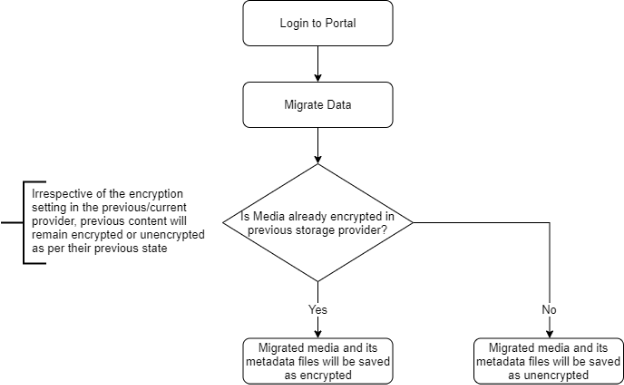
If you turn on data migration during setup wizard, then irrespective of the current encryption workflow - your data will be migrated from the previous content provider to the new content provider with its encryption settings preserved.
Here is a flowchart to aid understanding:
Copy Workflows
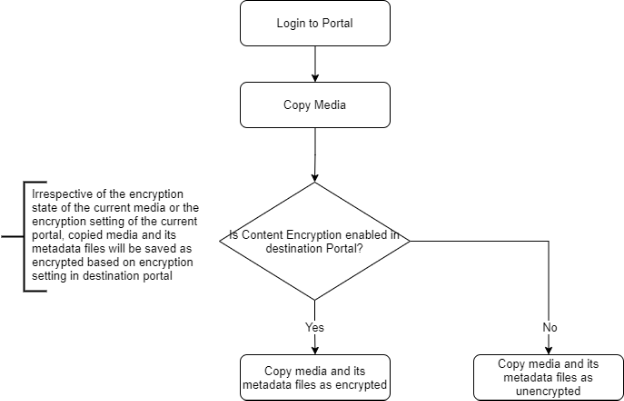
When you copy media from one portal to another, irrespective of the current encryption state of the media - the encryption setting in the destination portal determines whether the copied media will be saved as encrypted or unencrypted. The destination portal refers to the portal to which the media is being copied.
Here is a flowchart to aid understanding:
Clipping Workflows
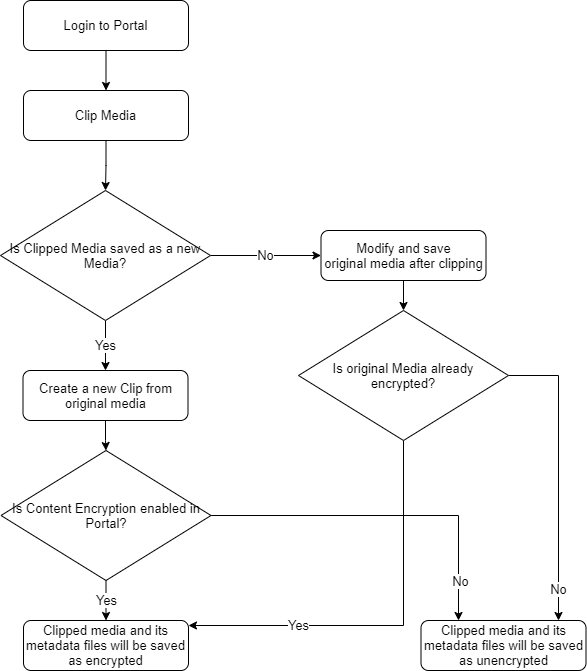
When you clip media in an encryption-enabled portal, there are two scenarios:
- When you clip original media and save it as-is, the encryption state of the media is preserved. It remains encrypted or unencrypted irrespective of the current encryption setting in the portal.
- When you create a new clip from original media, the clip is saved as encrypted only if the portal currently has encryption enabled.
Here is a flowchart to aid understanding:
Reupload Workflows
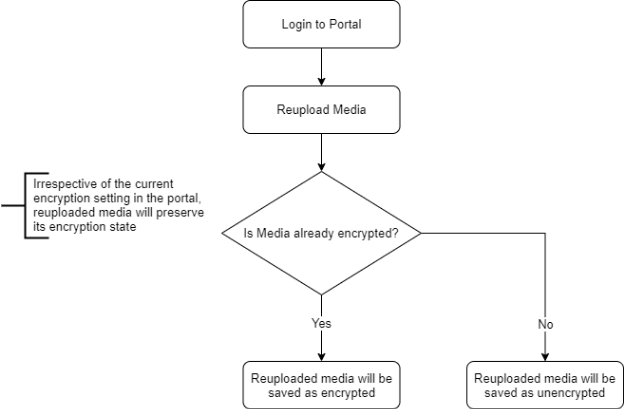
When you reupload media, the reuploaded file preserves its original encryption state regardless of the portal's current encryption setting. If the media was previously encrypted, the reuploaded media remains encrypted. If the media was unencrypted, the reuploaded media remains unencrypted.
Here is a flowchart to aid understanding:
Note: Whenever any metadata files such as Closed Caption files are uploaded or re-uploaded within a media, they are saved as encrypted if the media is encrypted.